Preset

Tutti i preset NOLGIA, gratis da sfogliare.

Parti da qualcosa di finito, non da un prompt vuoto. 12 workflow guidati, ognuno con i modelli che usa, i prompt dietro e quanto costa, prima che tu spenda un credito.

350 crediti gratuiti quando crei un account. Nessuna carta richiesta.

VIDEO

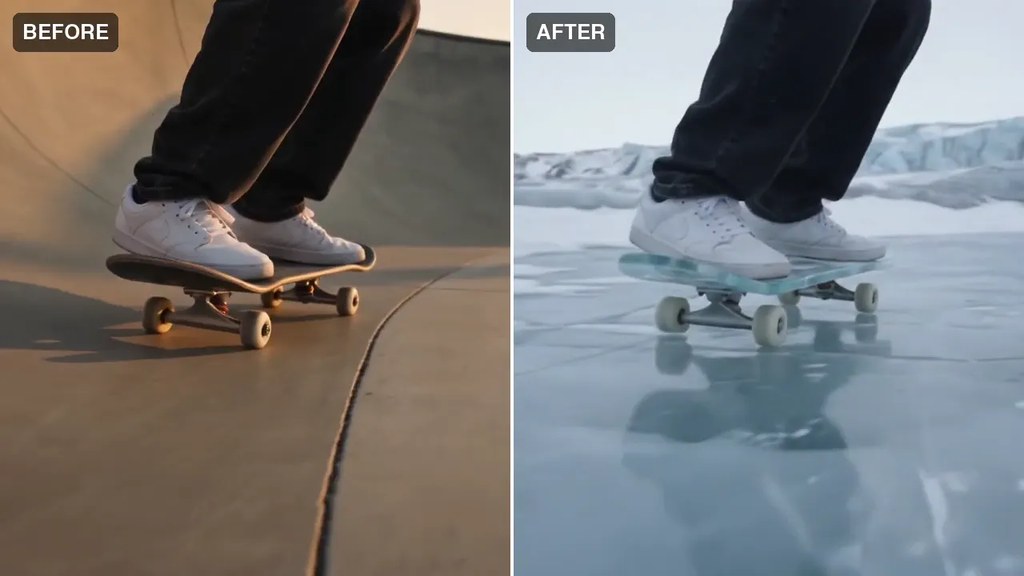
Esempio di output da Add effects to my footage

Upload your own clip and restyle it with prompt-driven effects. Reference-to-video keeps your motion while transforming the look.

Ideale per Turning real footage into stylized, effects-heavy shots.

Tempo stimato
~3–8 min
Crediti stimati
~200–500 credits stimati

Modelli Seedance 2.0 Pro

A charming animated cartoon scene with expressive characters and a storybook palette.

Ideale per Kids' content, mascots, and playful brand moments.

Tempo stimato
~2–4 min
Crediti stimati
~50–100 credits stimati

Modelli Seedance 2.5

A polished multi-shot commercial: hero shots, lifestyle beats, and a branded closing frame.

Ideale per Campaign launches and premium brand spots.

Tempo stimato
~20–40 min
Crediti stimati
~800–1,500 credits stimati

Modelli Veo 3.1 · Kling 3.0 Master

A friendly motion-graphics explainer that makes a complex idea land in under a minute.

Ideale per SaaS onboarding, how-it-works pages, and pitches.

Tempo stimato
~2–5 min
Crediti stimati
~200–350 credits stimati

Modelli Veo 3.1

A stylized multi-scene music video: synced cuts, bold looks, and a consistent visual world.

Ideale per Artists and labels visualizing a track fast.

Tempo stimato
~30–60 min
Crediti stimati
~1,000+ credits stimati

Modelli Seedance 2.0 Pro · Kling 3.0 Pro

A crisp demo that walks through your product's key features with clean studio shots.

Ideale per Landing pages, app stores, and sales decks.

Tempo stimato
~2–5 min
Crediti stimati
~200–350 credits stimati

Modelli Veo 3.1

A multi-shot short film: scripted scenes, consistent characters across shots, assembled into a finished cut.

Ideale per Narrative storytelling, festivals, and brand films.

Tempo stimato
~30–60 min
Crediti stimati
~1,500+ credits stimati

Modelli Seedance 2.0 Pro · Veo 3.1

A punchy, loop-worthy vertical clip built to stop the scroll in the first second.

Ideale per Daily posting and trend-jacking without a shoot.

Tempo stimato
~1–3 min
Crediti stimati
~100–250 credits stimati

Modelli Veo 3.1 Fast

A scroll-stopping creator-style ad: talking-head clip with hook text, timed captions, and a CTA end-card.

Ideale per Paid social hooks on TikTok, Reels, and Shorts.

Tempo stimato
~15–30 min
Crediti stimati
~400–900 credits stimati

Modelli Veo 3.1 · Seedance 2.0 Pro

A casual selfie-style try-on: a creator shows the fit and talks through it like a friend would.

Ideale per Fashion and beauty brands proving fit and feel.

Tempo stimato
~2–5 min
Crediti stimati
~200–350 credits stimati

Modelli Veo 3.1

An authentic first-reaction unboxing: hands opening the box, honest excitement to camera.

Ideale per Launches and gifting moments that need social proof.

Tempo stimato
~2–5 min
Crediti stimati
~200–350 credits stimati

Modelli Veo 3.1

IMMAGINE

Catalog-ready product photography: seamless background, soft studio light, crisp detail.

Ideale per Store listings, marketplaces, and lookbooks.

Tempo stimato
~30–60 sec
Crediti stimati
~5–20 credits stimati

Modelli GPT Image 2 · Imagen 4

Pronto a crearne uno?

Crea un account e NOLGIA Agent apre qualsiasi preset qui come chat guidata, con 350 crediti offerti da noi.

Inizia gratis

FAQ

Domande sui preset.

Cos'è un preset?
Un punto di partenza collaudato per un tipo di risultato, come foto prodotto o un breve spot. Contiene il prompt, il modello e le impostazioni, così descrivi la tua versione invece di costruire un prompt da zero.
Come uso un preset?
Aprilo e premi Usa preset. Il NOLGIA Agent apre una chat per quel preset e chiede solo ciò che gli serve: un'immagine, un personaggio, una riga di testo, una scelta. Controlla la stima dei crediti e premi Crea una volta.
Quanto costa un preset?
Un preset non ha un prezzo proprio. Paghi le generazioni che esegue alla tariffa in crediti pubblicata da ogni modello, più i turni del NOLGIA Agent quando è l'Agent a eseguirlo, e il passaggio di revisione mostra la stima dei crediti prima che tu prema Crea.
Cosa sono le direzioni?
Alcuni preset sono una famiglia: scegli il preset, poi una delle sue direzioni, ognuna con il suo look e il suo prompt, oppure descrivi la tua.
NOLGIA può suggerirmi una direzione?
Sì. Ogni pagina preset ha Suggeriscimi delle direzioni: scrivi un breve brief e scegli tra le direzioni proposte. Il pulsante mostra il suo prezzo in crediti prima che tu lo avvii.
Mi serve un account?
Non per sfogliarli: ogni preset e i suoi esempi sono pubblici. Per usarne uno, crea un account gratuito; ogni nuovo account parte con 350 crediti gratuiti.