Vorlagen

Jedes NOLGIA-Preset, kostenlos zum Stöbern.

Starte mit etwas Fertigem, nicht mit einem leeren Prompt. 12 geführte Workflows, jeder mit den Modellen, die er nutzt, den Prompts dahinter und seinen Kosten, bevor du einen Credit ausgibst.

350 kostenlose Credits, wenn du ein Konto erstellst. Keine Kreditkarte nötig.

VIDEO

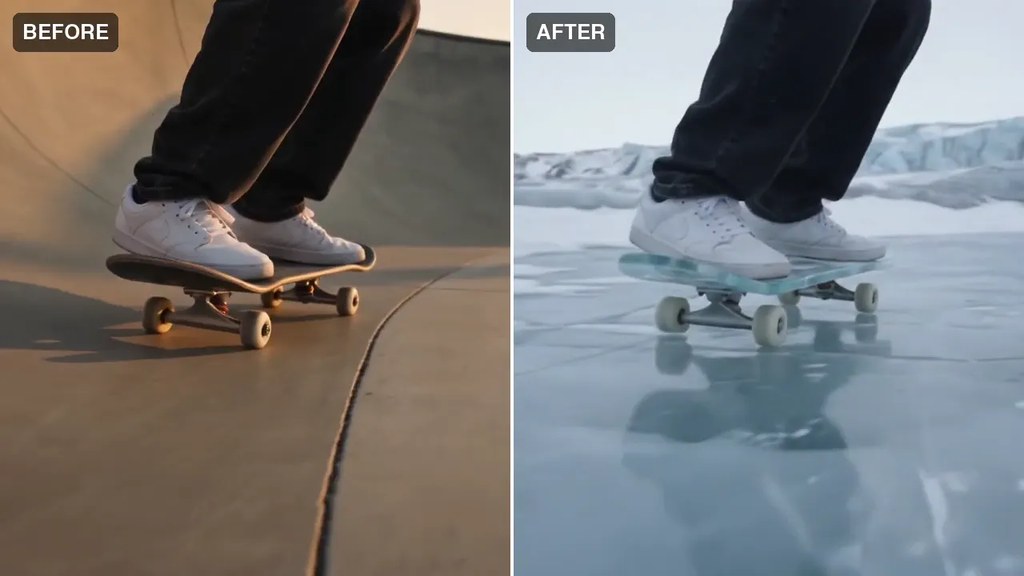
Beispielausgabe von Add effects to my footage

Upload your own clip and restyle it with prompt-driven effects. Reference-to-video keeps your motion while transforming the look.

Ideal für Turning real footage into stylized, effects-heavy shots.

Geschätzte Zeit
~3–8 min
Geschätzte Credits
ca. ~200–500 credits

Modelle Seedance 2.0 Pro

A charming animated cartoon scene with expressive characters and a storybook palette.

Ideal für Kids' content, mascots, and playful brand moments.

Geschätzte Zeit
~2–4 min
Geschätzte Credits
ca. ~50–100 credits

Modelle Seedance 2.5

A polished multi-shot commercial: hero shots, lifestyle beats, and a branded closing frame.

Ideal für Campaign launches and premium brand spots.

Geschätzte Zeit
~20–40 min
Geschätzte Credits
ca. ~800–1,500 credits

Modelle Veo 3.1 · Kling 3.0 Master

A friendly motion-graphics explainer that makes a complex idea land in under a minute.

Ideal für SaaS onboarding, how-it-works pages, and pitches.

Geschätzte Zeit
~2–5 min
Geschätzte Credits
ca. ~200–350 credits

Modelle Veo 3.1

A stylized multi-scene music video: synced cuts, bold looks, and a consistent visual world.

Ideal für Artists and labels visualizing a track fast.

Geschätzte Zeit
~30–60 min
Geschätzte Credits
ca. ~1,000+ credits

Modelle Seedance 2.0 Pro · Kling 3.0 Pro

A crisp demo that walks through your product's key features with clean studio shots.

Ideal für Landing pages, app stores, and sales decks.

Geschätzte Zeit
~2–5 min
Geschätzte Credits
ca. ~200–350 credits

Modelle Veo 3.1

A multi-shot short film: scripted scenes, consistent characters across shots, assembled into a finished cut.

Ideal für Narrative storytelling, festivals, and brand films.

Geschätzte Zeit
~30–60 min
Geschätzte Credits
ca. ~1,500+ credits

Modelle Seedance 2.0 Pro · Veo 3.1

A punchy, loop-worthy vertical clip built to stop the scroll in the first second.

Ideal für Daily posting and trend-jacking without a shoot.

Geschätzte Zeit
~1–3 min
Geschätzte Credits
ca. ~100–250 credits

Modelle Veo 3.1 Fast

A scroll-stopping creator-style ad: talking-head clip with hook text, timed captions, and a CTA end-card.

Ideal für Paid social hooks on TikTok, Reels, and Shorts.

Geschätzte Zeit
~15–30 min
Geschätzte Credits
ca. ~400–900 credits

Modelle Veo 3.1 · Seedance 2.0 Pro

A casual selfie-style try-on: a creator shows the fit and talks through it like a friend would.

Ideal für Fashion and beauty brands proving fit and feel.

Geschätzte Zeit
~2–5 min
Geschätzte Credits
ca. ~200–350 credits

Modelle Veo 3.1

An authentic first-reaction unboxing: hands opening the box, honest excitement to camera.

Ideal für Launches and gifting moments that need social proof.

Geschätzte Zeit
~2–5 min
Geschätzte Credits
ca. ~200–350 credits

Modelle Veo 3.1

BILD

Catalog-ready product photography: seamless background, soft studio light, crisp detail.

Ideal für Store listings, marketplaces, and lookbooks.

Geschätzte Zeit
~30–60 sec
Geschätzte Credits
ca. ~5–20 credits

Modelle GPT Image 2 · Imagen 4

Bereit, eins zu machen?

Erstelle ein Konto, und der NOLGIA Agent öffnet jedes Preset hier als geführten Chat, mit 350 Credits von uns.

Kostenlos starten

FAQ

Fragen zu Presets.

Was ist ein Preset?
Ein bewährter Ausgangspunkt für eine bestimmte Art von Ergebnis, etwa Produktfotos oder einen kurzen Werbespot. Es bringt Prompt, Modell und Einstellungen mit, du beschreibst also deine Version, statt an einem Prompt zu feilen.
Wie nutze ich ein Preset?
Öffne es und klicke auf „Preset verwenden“. Der NOLGIA Agent öffnet einen Chat für dieses Preset und fragt nur, was er braucht: ein Bild, einen Charakter, eine Textzeile, eine Auswahl. Prüfe die Credit-Schätzung und klicke einmal auf „Erstellen“.
Was kostet ein Preset?
Ein Preset hat keinen eigenen Preis. Du zahlst die Generierungen, die es ausführt, zum veröffentlichten Credit-Satz des jeweiligen Modells, plus Chatrunden mit dem NOLGIA Agent, wenn der Agent es ausführt. Der Prüfschritt zeigt dir die Credit-Schätzung, bevor du auf „Erstellen“ klickst.
Was sind Richtungen?
Manche Presets sind eine Familie: Wähle das Preset und dann eine Richtung darunter, jede mit eigenem Look und Prompt, oder beschreibe deine eigene.
Kann NOLGIA mir eine Richtung vorschlagen?
Ja. Jede Preset-Seite hat „Richtungen für mich vorschlagen“: Schreib ein kurzes Briefing und wähle aus den vorgeschlagenen Richtungen. Der Button zeigt seinen Preis in Credits, bevor du ihn ausführst.
Brauche ich ein Konto?
Zum Stöbern nicht: Alle Presets und ihre Beispiele sind öffentlich. Um eines auszuführen, erstelle ein kostenloses Konto; jedes neue Konto startet mit 350 kostenlosen Credits.